# 04. Planos de manutenção e planejamento

# Planos de Manutenção

<span style="font-size: 11pt; font-family: Arial; color: #000000; background-color: transparent; font-weight: bold; font-style: normal; font-variant: normal; text-decoration: none; vertical-align: baseline; white-space: pre-wrap;">Descrição: </span><span style="font-size: 11pt; font-family: Arial; color: rgb(0, 0, 0); background-color: transparent; font-style: normal; font-variant: normal; text-decoration: none; vertical-align: baseline; white-space: pre-wrap;"><span style="font-size: 11pt; font-family: Arial; color: #000000; background-color: transparent; font-weight: 400; font-style: normal; font-variant: normal; text-decoration: none; vertical-align: baseline; white-space: pre-wrap;">Este guia</span><span style="font-size: 11pt; font-family: Arial; color: #000000; background-color: transparent; font-weight: 400; font-style: normal; font-variant: normal; text-decoration: none; vertical-align: baseline; white-space: pre-wrap;"> </span><span style="font-size: 11pt; font-family: Arial; color: #000000; background-color: transparent; font-weight: 400; font-style: normal; font-variant: normal; text-decoration: none; vertical-align: baseline; white-space: pre-wrap;">contempla </span></span><span style="font-size: 11pt; font-family: Arial; color: rgb(0, 0, 0); background-color: transparent; font-style: normal; font-variant: normal; text-decoration: none; vertical-align: baseline; white-space: pre-wrap;"><span style="font-size: 11pt; font-family: Arial; color: #000000; background-color: transparent; font-weight: 400; font-style: normal; font-variant: normal; text-decoration: none; vertical-align: baseline; white-space: pre-wrap;">os passos de forma detalhada para implantação dos planos de manutenção.</span></span>

<span style="font-size: 11pt; font-family: Arial; color: #000000; background-color: transparent; font-weight: bold; font-style: normal; font-variant: normal; text-decoration: none; vertical-align: baseline; white-space: pre-wrap;"> 1. Instruções gerais</span>

<span style="font-size: 11pt; font-family: Arial; color: #000000; background-color: transparent; font-weight: 400; font-style: normal; font-variant: normal; text-decoration: none; vertical-align: baseline; white-space: pre-wrap;">Para que você consiga executá-lo, precisa de algumas informações. Como sugestão, você pode seguir o seguinte roteiro:</span>

- <span style="font-size: 11pt; font-family: Arial; color: #000000; background-color: transparent; font-weight: 400; font-style: normal; font-variant: normal; text-decoration: none; vertical-align: baseline; white-space: pre-wrap;"><span style="text-decoration: underline;">Levantamento dos dados das manutenções preventivas: </span>estas informações muitas vezes estão em documentos técnicos ou mesmo com os técnicos em campo. Você vai precisar saber o que fazer a cada 15 dias, 1 mês, 6 meses ou 1 ano por exemplo;</span>
- <span style="font-size: 11pt; font-family: Arial; color: #000000; background-color: transparent; font-weight: 400; font-style: normal; font-variant: normal; text-decoration: none; vertical-align: baseline; white-space: pre-wrap;"><span style="text-decoration: underline;">Registro das informações:</span> provavelmente as informações não estão em um local uniforme. Registre rapidamente em uma planilha de excel. Podemos importar estes dados posteriormente;</span>
- <span style="font-size: 11pt; font-family: Arial; color: #000000; background-color: transparent; font-weight: 400; font-style: normal; font-variant: normal; text-decoration: none; vertical-align: baseline; white-space: pre-wrap;"><span style="text-decoration: underline;">Cadastro de perguntas e questionários: </span>um questionário é basicamente uma lista de tarefas. Pense em uma forma de agrupar estas atividades a fim de serem reaproveitadas. Por exemplo, você pode ter uma inspeção de painel elétrico. Em alguns equipamentos, esta inspeção pode ser mensal. Já outros, devido a criticidade ou por serem mais antigos, talvez ela tenha que ser quinzenal. Mas as tarefas são as mesmas. Desta forma você precisa cadastrar apenas um questionário e 2 planos de manutenção, diminuindo o esforço necessário;</span>
- <span style="font-size: 11pt; font-family: Arial; color: #000000; background-color: transparent; font-weight: 400; font-style: normal; font-variant: normal; text-decoration: none; vertical-align: baseline; white-space: pre-wrap;"><span style="text-decoration: underline;">Cadastro de planos de manutenção:</span> este é o último cadastro antes da geração de ordens. Nele você vai utilizar os questionários cadastrados anteriormente. Você pode utilizar mais de um questionário. Pode colocar a inspeção de painel elétrico que falamos antes e uma lubrificação.</span>

2. <span style="font-size: 11pt; font-family: Arial; color: #000000; background-color: transparent; font-weight: bold; font-style: normal; font-variant: normal; text-decoration: none; vertical-align: baseline; white-space: pre-wrap;">Localização no menu</span>

<span style="font-size: 11pt; font-family: Arial; color: #000000; background-color: transparent; font-weight: 400; font-style: normal; font-variant: normal; text-decoration: none; vertical-align: baseline; white-space: pre-wrap;">O cadastro de planos de manutenção pode ser acessado na área administrativa, no menu Cadastros localizado na aba superior &gt; Planos, ou diretamente pelo link </span>[<span style="font-size: 11pt; font-family: Arial; color: #1155cc; background-color: transparent; font-weight: 400; font-style: normal; font-variant: normal; text-decoration: underline; -webkit-text-decoration-skip: none; text-decoration-skip-ink: none; vertical-align: baseline; white-space: pre-wrap;">https://app.spotecnologia.com.br/admin/registers/plans</span>](https://app.spotecnologia.com.br/admin/registers/plans)<span style="font-size: 11pt; font-family: Arial; color: #000000; background-color: transparent; font-weight: 400; font-style: normal; font-variant: normal; text-decoration: none; vertical-align: baseline; white-space: pre-wrap;"> ou pesquisando pelo nome:</span>

<span style="font-size: 11pt; font-family: Arial; color: #000000; background-color: transparent; font-weight: 400; font-style: normal; font-variant: normal; text-decoration: none; vertical-align: baseline; white-space: pre-wrap;"><span style="border: none; display: inline-block; overflow: hidden; width: 602px; height: 260px;">![](https://lh4.googleusercontent.com/ZvWHHryy2DxAuao_fVcItCTQbO3llj96DXcCTs-FgNbC6KIlGFsGqQxJMtL8utiH7UbSXuf1LdreE_86e-BnAMn_WE92hTvxF4rKmuksqb0TNAZQOI5JPoY40c1tY9QQTmZIYzPZUrnaDqlXSr-WL00)</span></span>

3. <span style="font-size: 11pt; font-family: Arial; color: #000000; background-color: transparent; font-weight: bold; font-style: normal; font-variant: normal; text-decoration: none; vertical-align: baseline; white-space: pre-wrap;">Cadastro de plano de manutenção</span>

<span style="font-size: 11pt; font-family: Arial; color: #000000; background-color: transparent; font-weight: 400; font-style: normal; font-variant: normal; text-decoration: none; vertical-align: baseline; white-space: pre-wrap;">Para cadastrar um novo plano, navegue até o final da tela e selecione “Criar Plano” ou clique diretamente no link </span>[<span style="font-size: 11pt; font-family: Arial; color: #1155cc; background-color: transparent; font-weight: 400; font-style: normal; font-variant: normal; text-decoration: underline; -webkit-text-decoration-skip: none; text-decoration-skip-ink: none; vertical-align: baseline; white-space: pre-wrap;">https://app.<span style="font-size: 11pt; font-family: Arial; color: rgb(17, 85, 204); background-color: transparent; font-weight: 400; font-style: normal; font-variant: normal; text-decoration-skip-ink: none; vertical-align: baseline; white-space: pre-wrap;">spotecnologia</span>.com.br/admin/registers/plans/create</span><span style="font-size: 11pt; font-family: Arial; color: #000000; background-color: transparent; font-weight: 400; font-style: normal; font-variant: normal; text-decoration: none; vertical-align: baseline; white-space: pre-wrap;"> </span>](https://app.spotecnologia.com.br/admin/registers/plans)

<span style="font-size: 11pt; font-family: Arial; color: #000000; background-color: transparent; font-weight: 400; font-style: normal; font-variant: normal; text-decoration: none; vertical-align: baseline; white-space: pre-wrap;"><span style="border: none; display: inline-block; overflow: hidden; width: 423px; height: 379px;">![](https://lh5.googleusercontent.com/-Wy3RaQZBpStH0wXYZ0VccBw2CLEUFy6qmXR86EMiJ8FFH0GB-4jyXKxne867iLnKSsIVvCCUuvhHvMPFaU-R-caBmfFtQCpERA7-Fncyy7cRomeujAYc_iLD5fRqLX0kLI7ijPX4obKsUFqSQN66sM)</span></span>

<span style="font-size: 11pt; font-family: Arial; color: #000000; background-color: transparent; font-weight: 400; font-style: normal; font-variant: normal; text-decoration: none; vertical-align: baseline; white-space: pre-wrap;">Preencha os campos:</span>

- <span style="font-size: 11pt; font-family: Arial; color: #000000; background-color: transparent; font-weight: 400; font-style: normal; font-variant: normal; text-decoration: none; vertical-align: baseline; white-space: pre-wrap;">Unidade: unidade do qual o plano faz parte;</span>
- <span style="font-size: 11pt; font-family: Arial; color: #000000; background-color: transparent; font-weight: 400; font-style: normal; font-variant: normal; text-decoration: none; vertical-align: baseline; white-space: pre-wrap;">Código: um código único que identifica um plano de manutenção. Por exemplo MP-30DD-12345 sendo MP de manutenção preventiva, 30DD refere-se a periodicidade de 30 dias e 12345 é o código do equipamento. Não precisa ser neste formato, este é um exemplo para que o código ajude a informar do que se trata o plano;</span>
- <span style="font-size: 11pt; font-family: Arial; color: #000000; background-color: transparent; font-weight: 400; font-style: normal; font-variant: normal; text-decoration: none; vertical-align: baseline; white-space: pre-wrap;">Ativo: se o plano está ativo. Padrão “Ativo”;</span>
- <span style="font-size: 11pt; font-family: Arial; color: #000000; background-color: transparent; font-weight: 400; font-style: normal; font-variant: normal; text-decoration: none; vertical-align: baseline; white-space: pre-wrap;">Produto/Equipamento: trata-se do equipamento a qual se refere o plano;</span>
- <span style="font-size: 11pt; font-family: Arial; color: #000000; background-color: transparent; font-weight: 400; font-style: normal; font-variant: normal; text-decoration: none; vertical-align: baseline; white-space: pre-wrap;">Tipo de OS: qual o tipo de ordem de serviço do plano;</span>
- <span style="font-size: 11pt; font-family: Arial; color: #000000; background-color: transparent; font-weight: 400; font-style: normal; font-variant: normal; text-decoration: none; vertical-align: baseline; white-space: pre-wrap;">Tipo de periodicidade: se o plano tem uma recorrência diária, semanal ou mensal. Isto indica como o sistema vai gerar as ordens, se por uma quantidade de dias, semanas ou meses;</span>
- <span style="font-size: 11pt; font-family: Arial; color: #000000; background-color: transparent; font-weight: 400; font-style: normal; font-variant: normal; text-decoration: none; vertical-align: baseline; white-space: pre-wrap;"> Periodicidade: o tempo que o sistema deve gerar uma nova ordem. Juntamente com o “Tipo de Periodicidade”. Ou seja, se no campo anterior selecionarmos diária e neste campo informarmos 30, o sistema vai entender que a cada 30 dias deverá gerar uma nova ordem.;</span>
- <span style="font-size: 11pt; font-family: Arial; color: #000000; background-color: transparent; font-weight: 400; font-style: normal; font-variant: normal; text-decoration: none; vertical-align: baseline; white-space: pre-wrap;">Atividades do plano: devem ser cadastradas quais atividades serão executadas. Por exemplo, uma atividade de manutenção mecânica e outra atividade de manutenção elétrica. Normalmente o plano contém somente 1 atividade. Para cada atividade, devemos informar:</span>
- <span style="font-size: 11pt; font-family: Arial; color: #000000; background-color: transparent; font-weight: 400; font-style: normal; font-variant: normal; text-decoration: none; vertical-align: baseline; white-space: pre-wrap;">Qual o tipo de atividade: manutenção mecânica, elétrica, etc. Os tipos de atividades são cadastrados no link </span>[<span style="font-size: 11pt; font-family: Arial; color: #1155cc; background-color: transparent; font-weight: 400; font-style: normal; font-variant: normal; text-decoration: underline; -webkit-text-decoration-skip: none; text-decoration-skip-ink: none; vertical-align: baseline; white-space: pre-wrap;">https://app.<span style="font-size: 11pt; font-family: Arial; color: rgb(17, 85, 204); background-color: transparent; font-weight: 400; font-style: normal; font-variant: normal; text-decoration-skip-ink: none; vertical-align: baseline; white-space: pre-wrap;">spotecnologia</span>.com.br/admin/registers/activity\_types</span>](https://app.spotecnologia.com.br/admin/registers/activity_types)<span style="font-size: 11pt; font-family: Arial; color: #000000; background-color: transparent; font-weight: 400; font-style: normal; font-variant: normal; text-decoration: none; vertical-align: baseline; white-space: pre-wrap;"> ou pelo menu Cadastros &gt; Tipos de Atividades;</span>
- <span style="font-size: 11pt; font-family: Arial; color: #000000; background-color: transparent; font-weight: 400; font-style: normal; font-variant: normal; text-decoration: none; vertical-align: baseline; white-space: pre-wrap;">Questionário: indica qual o questionário (checklist) que será utilizado no plano. Os questionários são cadastrados no link </span>[<span style="font-size: 11pt; font-family: Arial; color: #1155cc; background-color: transparent; font-weight: 400; font-style: normal; font-variant: normal; text-decoration: underline; -webkit-text-decoration-skip: none; text-decoration-skip-ink: none; vertical-align: baseline; white-space: pre-wrap;">https://app.<span style="font-size: 11pt; font-family: Arial; color: rgb(17, 85, 204); background-color: transparent; font-weight: 400; font-style: normal; font-variant: normal; text-decoration-skip-ink: none; vertical-align: baseline; white-space: pre-wrap;">spotecnologia</span>.com.br/admin/registers/checklists</span>](https://app.spotecnologia.com.br/admin/registers/checklists)<span style="font-size: 11pt; font-family: Arial; color: #000000; background-color: transparent; font-weight: 400; font-style: normal; font-variant: normal; text-decoration: none; vertical-align: baseline; white-space: pre-wrap;"> ou pelo menu Cadastros&gt;Questionários. Atenção, este é um dos dados mais importantes da manutenção preventiva pois indica especificamente quais os itens que serão averiguados. Cuidado para selecionar o questionário correto. Se tiver dúvidas, acesse a seção </span>[<span style="font-size: 11pt; font-family: Arial; color: #1155cc; background-color: transparent; font-weight: 400; font-style: normal; font-variant: normal; text-decoration: underline; -webkit-text-decoration-skip: none; text-decoration-skip-ink: none; vertical-align: baseline; white-space: pre-wrap;">Cadastro de questionários/checklists</span><span style="font-size: 11pt; font-family: Arial; color: #000000; background-color: transparent; font-weight: 400; font-style: normal; font-variant: normal; text-decoration: none; vertical-align: baseline; white-space: pre-wrap;"> deste manual;</span>](https://docs.spotecnologia.com.br/books/02-cadastros/page/questionariochecklist)
- <span style="font-size: 11pt; font-family: Arial; color: #000000; background-color: transparent; font-weight: 400; font-style: normal; font-variant: normal; text-decoration: none; vertical-align: baseline; white-space: pre-wrap;">Etapa: qual a etapa da manutenção, começando com 1 e sendo preenchida sequencialmente. Pode ser lida como uma ordem das atividades;</span>
- <span style="font-size: 11pt; font-family: Arial; color: #000000; background-color: transparent; font-weight: 400; font-style: normal; font-variant: normal; text-decoration: none; vertical-align: baseline; white-space: pre-wrap;">Técnico: caso já exista um técnico que irá atender esta manutenção, ele deverá ser informado. Normalmente é deixado em branco para que qualquer técnico possa atender;</span>
- <span style="font-size: 11pt; font-family: Arial; color: #000000; background-color: transparent; font-weight: 400; font-style: normal; font-variant: normal; text-decoration: none; vertical-align: baseline; white-space: pre-wrap;">Horas previstas: trata-se da quantidade de horas previstas para a realização da manutenção. Este dados irá compor os indicadores de manutenção de previsto x realizado;</span>


<span style="font-size: 11pt; font-family: Arial; color: #000000; background-color: transparent; font-weight: 400; font-style: normal; font-variant: normal; text-decoration: none; vertical-align: baseline; white-space: pre-wrap;">Após preenchidos os campos, o plano pode ser salvo clicando sobre o botão “Salvar”.</span>

<span style="font-size: 11pt; font-family: Arial; color: #000000; background-color: transparent; font-weight: 400; font-style: normal; font-variant: normal; text-decoration: none; vertical-align: baseline; white-space: pre-wrap;"><span style="border: none; display: inline-block; overflow: hidden; width: 327px; height: 286px;">![](https://lh6.googleusercontent.com/H-IqLtNafZLAhszfdrn4U32wWPgttFBbLTbWo7J9Gi6Om1wY4IEghNum9FlR2jA6EALCewBpN3eG8Uf2oFQEishViy3GsMOLX-QwPerN4Mr9Vj-WULKreUyHkSstGBRjXpY1cFesTMHrjJOSPevw61g)</span></span>

4. <span style="font-size: 11pt; font-family: Arial; color: #000000; background-color: transparent; font-weight: bold; font-style: normal; font-variant: normal; text-decoration: none; vertical-align: baseline; white-space: pre-wrap;">Cadastro de questionários/checklists</span>

<span style="font-size: 11pt; font-family: Arial; color: #000000; background-color: transparent; font-weight: 400; font-style: normal; font-variant: normal; text-decoration: none; vertical-align: baseline; white-space: pre-wrap;">Neste cadastro vamos informar ao sistema quais são os checklists que vamos utilizar no cadastro de planos de manutenção. Nele estarão listados todas as atividades que o técnico deverá executar na manutenção preventiva. Há um manual específico para o cadastro de questionários, acesse clicando no link <span style="text-decoration: underline; color: rgb(35, 111, 161);">[https://docs.spotecnologia.com.br/books/02-cadastros/page/questionariochecklist](https://docs.spotecnologia.com.br/books/02-cadastros/page/questionariochecklist)</span></span>

5. <span style="font-size: 11pt; font-family: Arial; color: #000000; background-color: transparent; font-weight: bold; font-style: normal; font-variant: normal; text-decoration: none; vertical-align: baseline; white-space: pre-wrap;">Cadastro de perguntas</span>

<span style="font-size: 11pt; font-family: Arial; color: #000000; background-color: transparent; font-weight: 400; font-style: normal; font-variant: normal; text-decoration: none; vertical-align: baseline; white-space: pre-wrap;">Você também irá cadastrar as perguntas que compõem o questionário. Nelas estará descrito exatamente o que o manutentor em campo deve fazer ou registrar. Há um manual específico para as perguntas, acesse clicando no link <span style="text-decoration: underline; color: rgb(35, 111, 161);">[https://docs.spotecnologia.com.br/books/02-cadastros/page/perguntas](https://docs.spotecnologia.com.br/books/02-cadastros/page/perguntas)</span></span>

6. <span style="font-size: 11pt; font-family: Arial; color: #000000; background-color: transparent; font-weight: bold; font-style: normal; font-variant: normal; text-decoration: none; vertical-align: baseline; white-space: pre-wrap;">Importação de questionários e perguntas</span>

<span style="font-size: 11pt; font-family: Arial; color: #000000; background-color: transparent; font-weight: 400; font-style: normal; font-variant: normal; text-decoration: none; vertical-align: baseline; white-space: pre-wrap;">Você também pode importar os questionários e perguntas diretamente para o sistema. Para isto acesse o menu Cadastros &gt; Importação de Questionários e Perguntas ou clique no link </span><span style="font-size: 11pt; font-family: Arial; color: #1155cc; background-color: transparent; font-weight: 400; font-style: normal; font-variant: normal; text-decoration: underline; -webkit-text-decoration-skip: none; text-decoration-skip-ink: none; vertical-align: baseline; white-space: pre-wrap;">https://app.<span style="font-size: 11pt; font-family: Arial; color: rgb(17, 85, 204); background-color: transparent; font-weight: 400; font-style: normal; font-variant: normal; text-decoration-skip-ink: none; vertical-align: baseline; white-space: pre-wrap;">spotecnologia</span>.com.br/admin/registers/checklists/import</span><span style="font-size: 11pt; font-family: Arial; color: #000000; background-color: transparent; font-weight: 400; font-style: normal; font-variant: normal; text-decoration: none; vertical-align: baseline; white-space: pre-wrap;"> </span>

<span style="font-size: 11pt; font-family: Arial; color: #000000; background-color: transparent; font-weight: 400; font-style: normal; font-variant: normal; text-decoration: none; vertical-align: baseline; white-space: pre-wrap;"><span style="border: none; display: inline-block; overflow: hidden; width: 224px; height: 280px;">![](https://lh3.googleusercontent.com/f1wG2Lf7Aog0xE1A3y1bOfJ9kiLQ6O5l-_CNChXig9NOuFOLobZNaCFsv4I6Ylo71x5lMdMdXwYM9ZGjghCUvv3M1uOpriXWc5lF5nRGZcaP5PokCEPGmSujWpmztCr5PJW7S8vldg2vEjFqgDhCcVU)</span></span>

<span style="font-size: 11pt; font-family: Arial; color: #000000; background-color: transparent; font-weight: 400; font-style: normal; font-variant: normal; text-decoration: none; vertical-align: baseline; white-space: pre-wrap;">Baixe o modelo e utilize ele como base para a importação clicando no botão “Ver modelo:</span>

<span style="font-size: 11pt; font-family: Arial; color: #000000; background-color: transparent; font-weight: 400; font-style: normal; font-variant: normal; text-decoration: none; vertical-align: baseline; white-space: pre-wrap;"><span style="border: none; display: inline-block; overflow: hidden; width: 357px; height: 221px;">![](https://lh4.googleusercontent.com/5E7Xyh9kS1qBi-tfVmVkNpzMHnNLNT8DYqPnxfN6DZm8pQ_xemSFCg7q-rJAQI0tEmtZgXYdJcpERMYcDsuXKtz5aWjkAlci6awWO7FMzcIlx41qGOgOE_wxPX2tiMmlF71TIDou19lhN48p3ViTQ74)</span></span>

<span style="font-size: 11pt; font-family: Arial; color: #000000; background-color: transparent; font-weight: 400; font-style: normal; font-variant: normal; text-decoration: none; vertical-align: baseline; white-space: pre-wrap;">O modelo tem vários comentários dando orientações em relação ao campo. Neste modelo, você deve preencher:</span>

- <span style="font-size: 11pt; font-family: Arial; color: #000000; background-color: transparent; font-weight: 400; font-style: normal; font-variant: normal; text-decoration: none; vertical-align: baseline; white-space: pre-wrap;">CODIGO\_QUESTIONARIO: o código que deseja que o questionário tenha. Ele deve ser único. Exemplo: MPPE para uma “Manutenção Preventiva de Painel Elétrico” por exemplo. Se você utilizar um código já existente, o sistema irá buscar este questionário do sistema e acrescentar as perguntas caso elas não existam;</span>
- <span style="font-size: 11pt; font-family: Arial; color: #000000; background-color: transparent; font-weight: 400; font-style: normal; font-variant: normal; text-decoration: none; vertical-align: baseline; white-space: pre-wrap;">QUESTIONARIO: Descrição do questionário, por exemplo “Manutenção Preventiva de Painel Elétrico”;</span>
- <span style="font-size: 11pt; font-family: Arial; color: #000000; background-color: transparent; font-weight: 400; font-style: normal; font-variant: normal; text-decoration: none; vertical-align: baseline; white-space: pre-wrap;">ATIVO: Se o questionário está ativo. 1 para ativo, 0 para inativo. Normalmente 1;</span>
- <span style="font-size: 11pt; font-family: Arial; color: #000000; background-color: transparent; font-weight: 400; font-style: normal; font-variant: normal; text-decoration: none; vertical-align: baseline; white-space: pre-wrap;">OBJETIVO: O objetivo do questionário. Por exemplo “Manutenção Preventiva de Painel Elétrico”;</span>
- <span style="font-size: 11pt; font-family: Arial; color: #000000; background-color: transparent; font-weight: 400; font-style: normal; font-variant: normal; text-decoration: none; vertical-align: baseline; white-space: pre-wrap;">CODIGO\_PERGUNTA: O código da pergunta dentro do sistema. Por exemplo 1000. Se você utilizar um código já existente, o sistema irá buscar esta pergunta e não irá cadastrar uma nova;</span>
- <span style="font-size: 11pt; font-family: Arial; color: #000000; background-color: transparent; font-weight: 400; font-style: normal; font-variant: normal; text-decoration: none; vertical-align: baseline; white-space: pre-wrap;">PERGUNTA: A descrição da pergunta. Por exemplo “Medir tensão do painel elétrico”;</span>
- <span style="font-size: 11pt; font-family: Arial; color: #000000; background-color: transparent; font-weight: 400; font-style: normal; font-variant: normal; text-decoration: none; vertical-align: baseline; white-space: pre-wrap;">TIPO: Se conteúdo ou título. Normalmente Conteúdo;</span>
- <span style="font-size: 11pt; font-family: Arial; color: #000000; background-color: transparent; font-weight: 400; font-style: normal; font-variant: normal; text-decoration: none; vertical-align: baseline; white-space: pre-wrap;">TIPO\_RESPOSTA: Qual o tipo de resposta que deve ser dado pelo usuário. Por exemplo “Lógica” para Executado ou Não Executado;</span>
- <span style="font-size: 11pt; font-family: Arial; color: #000000; background-color: transparent; font-weight: 400; font-style: normal; font-variant: normal; text-decoration: none; vertical-align: baseline; white-space: pre-wrap;">CAMPO\_VISUAL: a forma que será mostrada para ser preenchida pelo usuário. Normalmente “Combo Box”;</span>
- <span style="font-size: 11pt; font-family: Arial; color: #000000; background-color: transparent; font-weight: 400; font-style: normal; font-variant: normal; text-decoration: none; vertical-align: baseline; white-space: pre-wrap;">UNIDADE\_MEDIDA: Unidade de medida da resposta. Exemplo “V”. Opcional;</span>
- <span style="font-size: 11pt; font-family: Arial; color: #000000; background-color: transparent; font-weight: 400; font-style: normal; font-variant: normal; text-decoration: none; vertical-align: baseline; white-space: pre-wrap;">VALOR\_MINIMO: O valor mínimo da resposta. Por exemplo, 200V. Opcional;</span>
- <span style="font-size: 11pt; font-family: Arial; color: #000000; background-color: transparent; font-weight: 400; font-style: normal; font-variant: normal; text-decoration: none; vertical-align: baseline; white-space: pre-wrap;">VALOR\_MAXIMO: O valor máximo da resposta. Por exemplo, 240V. Opcional;</span>

<span style="font-size: 11pt; font-family: Arial; color: #000000; background-color: transparent; font-weight: 400; font-style: normal; font-variant: normal; text-decoration: none; vertical-align: baseline; white-space: pre-wrap;"><span class="Apple-tab-span" style="white-space: pre;"> </span></span>

7. <span style="font-size: 11pt; font-family: Arial; color: #000000; background-color: transparent; font-weight: bold; font-style: normal; font-variant: normal; text-decoration: none; vertical-align: baseline; white-space: pre-wrap;">Geração de ordens</span>

<span style="font-size: 11pt; font-family: Arial; color: #000000; background-color: transparent; font-weight: 400; font-style: normal; font-variant: normal; text-decoration: none; vertical-align: baseline; white-space: pre-wrap;">Após os planos terem sido cadastrados, você pode gerar as ordens. Para isto, acesse o menu Rotinas&gt;Mapa de Manutenção planejadas ou pelo link </span>[<span style="font-size: 11pt; font-family: Arial; color: #1155cc; background-color: transparent; font-weight: 400; font-style: normal; font-variant: normal; text-decoration: underline; -webkit-text-decoration-skip: none; text-decoration-skip-ink: none; vertical-align: baseline; white-space: pre-wrap;">https://app.</span>](https://app.gsctransforma.com.br/admin/routines/planned/maintenance_map)<span style="font-size: 11pt; font-family: Arial; color: #1155cc; background-color: transparent; font-weight: 400; font-style: normal; font-variant: normal; text-decoration: underline; -webkit-text-decoration-skip: none; text-decoration-skip-ink: none; vertical-align: baseline; white-space: pre-wrap;"><span style="font-size: 11pt; font-family: Arial; color: rgb(17, 85, 204); background-color: transparent; font-weight: 400; font-style: normal; font-variant: normal; text-decoration-skip-ink: none; vertical-align: baseline; white-space: pre-wrap;">spotecnologia</span></span>[<span style="font-size: 11pt; font-family: Arial; color: #1155cc; background-color: transparent; font-weight: 400; font-style: normal; font-variant: normal; text-decoration: underline; -webkit-text-decoration-skip: none; text-decoration-skip-ink: none; vertical-align: baseline; white-space: pre-wrap;">.com.br/admin/routines/planned/maintenance\_map</span>](https://app.gsctransforma.com.br/admin/routines/planned/maintenance_map)<span style="font-size: 11pt; font-family: Arial; color: #000000; background-color: transparent; font-weight: 400; font-style: normal; font-variant: normal; text-decoration: none; vertical-align: baseline; white-space: pre-wrap;"> </span>

<span style="font-size: 11pt; font-family: Arial; color: #000000; background-color: transparent; font-weight: 400; font-style: normal; font-variant: normal; text-decoration: none; vertical-align: baseline; white-space: pre-wrap;"><span style="border: none; display: inline-block; overflow: hidden; width: 463px; height: 243px;">![](https://lh6.googleusercontent.com/siKOU0xemdu6CnebxoNtlU4w1WGkYHXY15oeTLBq3Q_uxLwZaKbAx5Nm0qlmNW5L6MyZZCqNhYea66nff9HWWkOmuYtEyBMhxVX02ByhErERswnrViKwoYMwgVNU_Hv7L08nYDtUjW0u2eVrQY8OdmY)</span></span>

<span style="font-size: 11pt; font-family: Arial; color: #000000; background-color: transparent; font-weight: 400; font-style: normal; font-variant: normal; text-decoration: none; vertical-align: baseline; white-space: pre-wrap;">Feito isto, selecione a opção “Atualizar Mapa” para que o sistema busque todos os planos e crie os planejamentos:</span>

<span style="font-size: 11pt; font-family: Arial; color: #000000; background-color: transparent; font-weight: 400; font-style: normal; font-variant: normal; text-decoration: none; vertical-align: baseline; white-space: pre-wrap;"><span style="border: none; display: inline-block; overflow: hidden; width: 409px; height: 231px;">![](https://lh5.googleusercontent.com/bKek7mjVC017HFiW8I5HQ-UwfIlotNOa4Kq0wOSvgBxRMIbbJiakOSLnXLrg1cwaZRxZoWoBwGs_YK4CEUjGFgF8bijrdfscgmoSvYhxC4OtPfpHHeUQJBVNlOwrwO49dkVsydTOVqfhApekWVv-Jzo)</span></span>

<span style="font-size: 11pt; font-family: Arial; color: #000000; background-color: transparent; font-weight: 400; font-style: normal; font-variant: normal; text-decoration: none; vertical-align: baseline; white-space: pre-wrap;">Por padrão, o sistema traz o planejamento do mês atual. Se quiser visualizar outro mês, selecione filtros</span>

<span style="font-size: 11pt; font-family: Arial; color: #000000; background-color: transparent; font-weight: 400; font-style: normal; font-variant: normal; text-decoration: none; vertical-align: baseline; white-space: pre-wrap;"><span style="border: none; display: inline-block; overflow: hidden; width: 410px; height: 231px;">![](https://lh4.googleusercontent.com/xmTpYAYcznxHCCVeuKBby2R1ZJEvIRuhEj6_AKuRn9InvCfhn1OO9hcWLD9-5E0tNvr_DgThT2CG1pULHDM9mmQuKEZSVpBrAHr1y_oWblr3LmCzQ7Y2PAQ1ikZbqguIy4-jU6f3Hc6vmMrvF2dXrWM)</span></span>

<span style="font-size: 11pt; font-family: Arial; color: #000000; background-color: transparent; font-weight: 400; font-style: normal; font-variant: normal; text-decoration: none; vertical-align: baseline; white-space: pre-wrap;">e filtre conforme necessário</span>

<span style="font-size: 11pt; font-family: Arial; color: #000000; background-color: transparent; font-weight: 400; font-style: normal; font-variant: normal; text-decoration: none; vertical-align: baseline; white-space: pre-wrap;"><span style="border: none; display: inline-block; overflow: hidden; width: 602px; height: 140px;">![](https://lh3.googleusercontent.com/p5FemPi6yh0g966SJE_mroSOgrVmiwnC4CMO6duWPuAaJi9wozpuJrpYSZ1SHOIep2RbZw0tld9jNScmstD0FU9w2X2HpalhO1fFNI_qr5xTNRwhch6CUDrgUlQWh6L8dZ8ScC1a49j9SvQdLfT1vH4)</span></span>

<span style="font-size: 11pt; font-family: Arial; color: #000000; background-color: transparent; font-weight: 400; font-style: normal; font-variant: normal; text-decoration: none; vertical-align: baseline; white-space: pre-wrap;">Após gerar o planejamento, você pode conferir quais planejamentos foram gerados. Se todos estiverem corretos, você pode então gerar as ordens. Para isto, selecione “Gerar Ordens”</span>

<span style="font-size: 11pt; font-family: Arial; color: #000000; background-color: transparent; font-weight: 400; font-style: normal; font-variant: normal; text-decoration: none; vertical-align: baseline; white-space: pre-wrap;"><span style="border: none; display: inline-block; overflow: hidden; width: 602px; height: 100px;">![](https://lh4.googleusercontent.com/Is9QfHVKvjyoyMG77qFO4c9E1tgwmAPbUGOfE7R3tAvG0uH8fggGarj0_LheyMj4GgvmGubuhDReMvt8Iwt9x7z27A7KvYsTAMxbkzvUb3-XeDuk2HNdgyC3rk1_ARf5_rdArOwPbNB0GjMg8ojcN3k)</span></span>

<span style="font-size: 11pt; font-family: Arial; color: #000000; background-color: transparent; font-weight: 400; font-style: normal; font-variant: normal; text-decoration: none; vertical-align: baseline; white-space: pre-wrap;">Neste momento o sistema irá buscar todos os planejamentos e gerar as ordens.</span>

<span style="font-size: 11pt; font-family: Arial; color: #000000; background-color: transparent; font-weight: 400; font-style: normal; font-variant: normal; text-decoration: none; vertical-align: baseline; white-space: pre-wrap;">Você também pode fazer estes dois passos ao mesmo tempo, selecionando “Atualizar mapa e gerar ordens”</span>

<span style="font-size: 11pt; font-family: Arial; color: #000000; background-color: transparent; font-weight: 400; font-style: normal; font-variant: normal; text-decoration: none; vertical-align: baseline; white-space: pre-wrap;"><span style="border: none; display: inline-block; overflow: hidden; width: 602px; height: 104px;">![](https://lh4.googleusercontent.com/5QiSMLbdlxrrgFPRB8ea_M1shPk9Bht_mFsnZ3cA721O1unvmq-q7Sq2ValWNcpSzeaZJAwiG1uMLNf3sJY0tJNdsYPzUy8A8sAOTfn25PnJ2LqtsD9eMxU_FIj_oRiK2wOykv6XOFsL1RdKZl2p8HE)</span></span>

8. <span style="font-size: 11pt; font-family: Arial; color: #000000; background-color: transparent; font-weight: 400; font-style: normal; font-variant: normal; text-decoration: none; vertical-align: baseline; white-space: pre-wrap;">Dúvidas e contato</span>

<span style="font-size: 11pt; font-family: Arial; color: #000000; background-color: transparent; font-weight: 400; font-style: normal; font-variant: normal; text-decoration: none; vertical-align: baseline; white-space: pre-wrap;">Se ainda ficou alguma dúvida, envia um email para </span>[<span style="font-size: 11pt; font-family: Arial; color: #1155cc; background-color: transparent; font-weight: 400; font-style: normal; font-variant: normal; text-decoration: underline; -webkit-text-decoration-skip: none; text-decoration-skip-ink: none; vertical-align: baseline; white-space: pre-wrap;">odair@spotecnologia.com.br</span>](mailto:odair@spotecnologia.com.br)<span style="font-size: 11pt; font-family: Arial; color: #000000; background-color: transparent; font-weight: 400; font-style: normal; font-variant: normal; text-decoration: none; vertical-align: baseline; white-space: pre-wrap;"> que iremos lhe ajudar.</span>

# Perguntas frequentes:

1. **O sistema gerou um plano mensal e um anual, mas era para ter sido gerado apenas um plano mensal, pois o plano anual havia sido encerrado. Por quê gerou um anual?**

As ordens são gerados no último dia do mês, de madrugada até as 2h. Provavelmente o plano que estava como anual, foi inativado <span style="text-decoration: underline;">após</span> essa geração, sendo assim no momento da geração, o plano estava ativo. Como posso ter certeza disso?

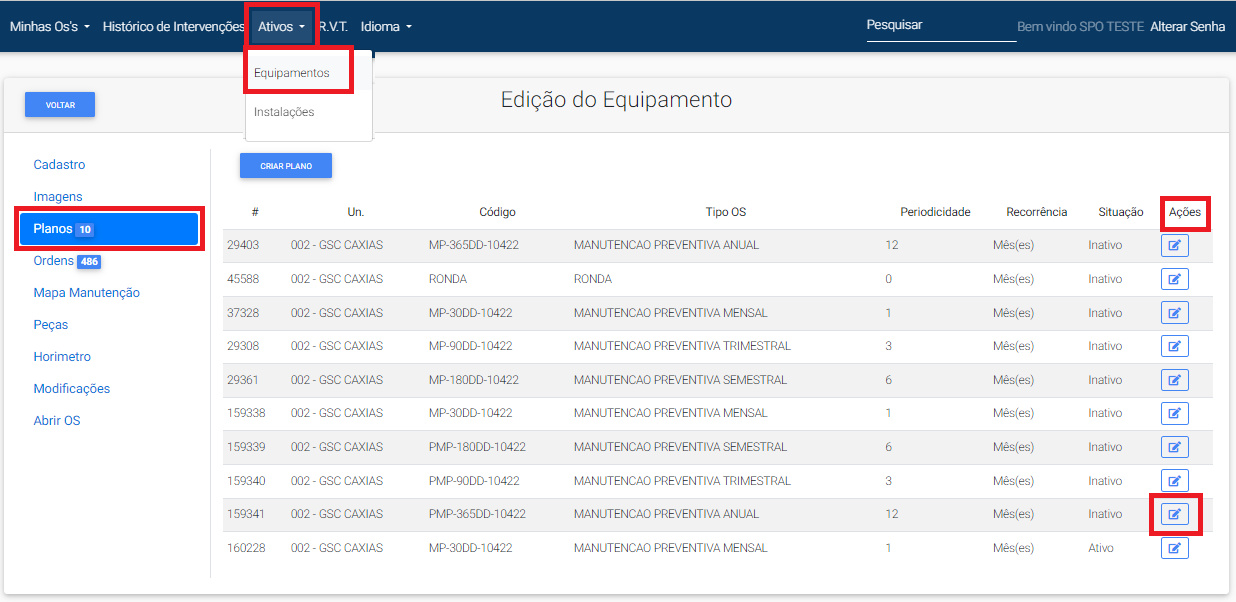
- Acesse o menu "Ativos" e selecione "Equipamentos";
- Selecione na coluna á esquerda "Planos";
- No campo "Situação" verifique quais e quantos planos estão ativos e os que estão encerrados;
- Para verificar quando um dos planos foi encerrado, clique no botão "Editar" na coluna "Ações" do plano que desejas verificar;
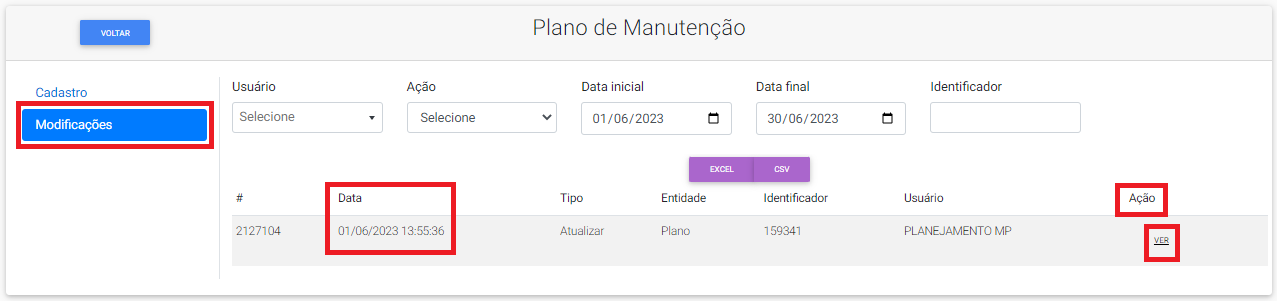
- Clique no menu "Modificações" na coluna á esquerda;
- Na coluna "Ação", clique no botão "Ver", irá aparecer a informação do código do equipamento e "Ativo 1" e "Ativo 0";
- "Ativo 1" significa que o plano está ativo e "Ativo 0" significa que o plano está encerrado;
- Compare essa informação com a data que estiver no menu de "Modificações;
- Essa data sinaliza o último dia em que aquele plano foi editado.

[![plano de manutenção editar equipamento.PNG](https://docs.spotecnologia.com.br/uploads/images/gallery/2023-06/scaled-1680-/plano-de-manutencao-editar-equipamento.PNG)](https://docs.spotecnologia.com.br/uploads/images/gallery/2023-06/plano-de-manutencao-editar-equipamento.PNG)
[![plano de manutenção modificações.PNG](https://docs.spotecnologia.com.br/uploads/images/gallery/2023-06/scaled-1680-/plano-de-manutencao-modificacoes.PNG)](https://docs.spotecnologia.com.br/uploads/images/gallery/2023-06/plano-de-manutencao-modificacoes.PNG)
[![plano de manutenção ver.PNG](https://docs.spotecnologia.com.br/uploads/images/gallery/2023-06/scaled-1680-/plano-de-manutencao-ver.PNG)](https://docs.spotecnologia.com.br/uploads/images/gallery/2023-06/plano-de-manutencao-ver.PNG)
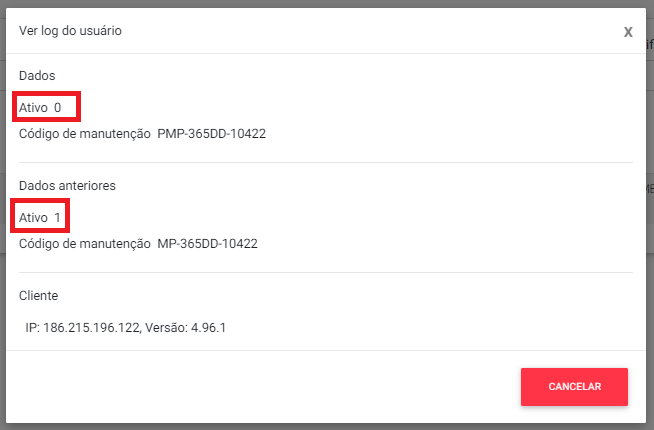
Neste caso, podemos observar que o "Ativo 0" é a última modificação, sinalizando que este plano foi encerrado. E comparando isso com a data da segunda imagem (dia 01/06/2023 as 13h55min), significa que o sistema gerou a ordem deste plano no dia anterior de madrugada até as 2h, mas o plano foi encerrado apenas no dia seguinte as 13h55 da tarde.
